
Microfrontends (MFEs) have revolutionized frontend development by enabling modular, scalable, and independently deployable UI components. However, testing such distributed architectures introduces unique challenges—especially in UI automation.
Playwright, a modern end-to-end testing framework, offers powerful solutions to tackle these challenges effectively. In this deep-dive blog, we’ll explore:
✔ Key challenges in testing Microfrontends
✔ How Playwright solves these challenges
✔ Best practices for scalable test automation
Let’s Explore…
Challenges of Testing Micro Frontends
1. Cross-Application State Management
Challenge:
- MFEs share state (auth tokens, user preferences) across different teams’ codebases
- Tests fail when state isn’t synchronized between micro-apps
Solution:
- Context Isolation: Create separate browser contexts for each test scenario
const context = await browser.newContext();
const page = await context.newPage();
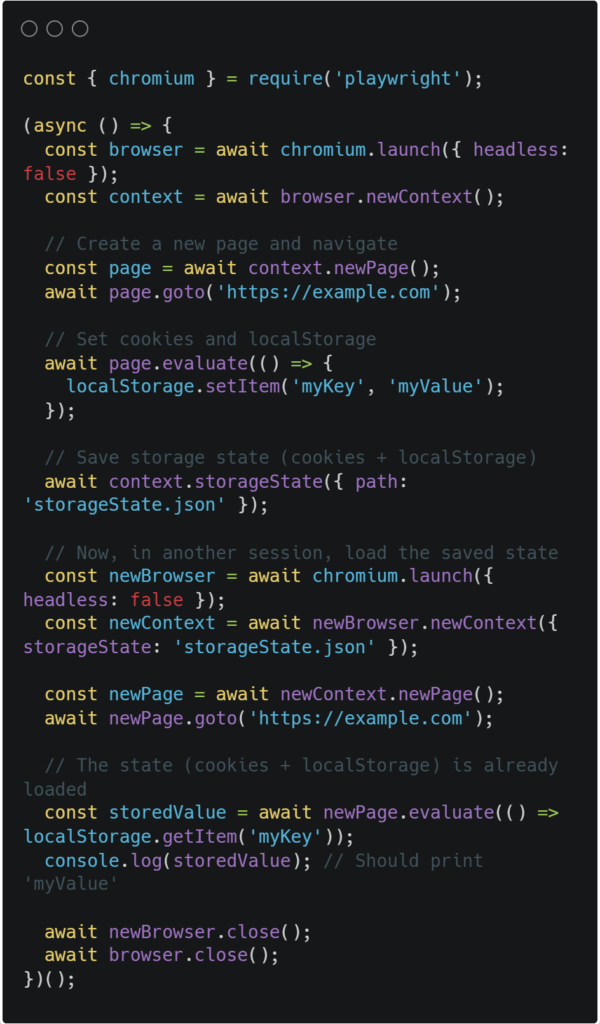
- State Reuse: Persist and share authentication state across tests
// Save state
await page.context().storageState({ path: ‘authState.json’ });
// Reuse state
const context = await browser.newContext({ storageState: ‘authState.json’ });
2. Asynchronous Loading & Race Conditions
Challenge:
- Independent MFE bundles load at different times
- UI tests fail due to elements not being ready
Solution:
- Auto-Waiting: Built-in assertions wait for elements
await expect(page.getByRole(‘button’, { name: ‘Submit’ })).toBeEnabled();
- Network State Control: Wait for critical resources
await page.waitForLoadState(‘domcontentloaded’);
await page.waitForResponse(response =>
response.url().includes(‘/api/data’) && response.status() === 200
);
3. Versioning & Dependency Conflicts
Challenge:
- Different teams use incompatible framework versions
- Shared dependencies cause rendering inconsistencies
Solution:
- Visual Regression Testing: Catch UI discrepancies
expect(await page.locator(‘.checkout-form’).screenshot())
.toMatchSnapshot(‘checkout-v2.png’);
- Dependency Mocking: Isolate version-specific behavior
await page.route(‘**/react-version’, route => route.fulfill({ body: JSON.stringify({ version: ‘18.2.0’ }) }));
4. Cross-Origin iframes & Shadow DOM
Challenge:
- Encapsulated components break traditional selectors
- iframe boundaries prevent direct element access
Solution:
- Shadow DOM Piercing: Directly access shadow roots
await page.locator(‘custom-element >>> .inner-button’).click();
- Frame Context Switching: Target iframes precisely
const frame = page.frameLocator(‘#payment-iframe’);
await frame.locator(‘#credit-card’).fill(‘4111111111111111’);
5. CI/CD Pipeline Integration
Challenge:
- Independent deployments require targeted test runs
- Full regression suites become too slow
Solution:
- Test Partitioning: Run only affected MFE tests
npx playwright test tests/checkout/ –project=chromium
- Parallel Execution: Scale across workers
// playwright.config.ts
export default {
workers: process.env.CI ? 4 : undefined
};
Why Use Playwright for Micro Frontend Testing?
| Challenge | Playwright Solution | Alternative Tools Limitation |
| Shared State | Isolated contexts & storage reuse | Cypress: No easy state sharing |
| Async Loading | Auto-waiting & network idle detection | Selenium: Manual waits required |
| Version Conflicts | Visual regression testing | Cypress: Limited snapshot management |
| iframe/Shadow DOM | Native piercing selectors | Selenium: Complex workarounds needed |
Read Also: How to Perform Visual Regression Testing with Playwright?
Top Best Practices for Scalable Test Automation Frameworks
1. Modular Test Architecture
-> Organize Tests by Feature or MFE Scope
Instead of monolithic test suites, structure tests based on:
- Micro frontend boundaries (e.g., auth/, checkout/, dashboard/)
- Business domains (e.g., user-management/, payment-flow/)
For ex:
tests/
├── auth/
│ ├── login.spec.ts
│ └── registration.spec.ts
├── dashboard/
│ ├── widgets.spec.ts
│ └── analytics.spec.ts
└── checkout/
├── cart.spec.ts
└── payment.spec.ts
-> Reuse Shared Utilities
Extract common functions (e.g., login, API mocking) into helper files:
// utils/auth.ts
export async function login(page: Page, user: string) {
await page.fill(‘#username’, user);
await page.click(‘#login-btn’);
}
2. Optimize Test Performance
-> Parallel Test Execution
Run independent tests concurrently to reduce execution time:
npx playwright test –workers 4 (# Runs 4 tests in parallel )
-> Selective Test Execution
Run only affected tests using:
- Tag-based filtering (@smoke, @regression) => npx playwright test –tags=@somke
- File-based targeting => npx playwright tests/auth/login.spec.ts
-> Smart Waiting Over Hard Delays
To avoid page.waitForTimeout(5000) then use Playwright’s built-in auto-waiting:
await expect(page.locator(‘.success-message’)).toBeVisible();
3. Enhance Test Reliability
-> Mock External Dependencies
Isolate tests by mocking:
- APIs (using page.route())
- Third-party services (e.g., Stripe, Auth0)
Browser storage (localStorage, cookies)
-> Implement Retry Logic for Flaky Tests
Configure retries in playwright.config.ts:
export default {
retries: 2, // Retries failed tests twice
};
4. Maintainable Test Design
-> Use Page Object Model (POM) or Component Object Model (COM)
Encapsulate UI interactions for reusability:
class LoginPage {
constructor(private page: Page) {}
async login(username: string) {
await this.page.fill(‘#username’, username);
await this.page.click(‘#submit’);
}
}
-> Prioritize Accessibility & Semantic Selectors
Avoid brittle XPath/CSS selectors—use data-testid or ARIA roles:
<button data-testid=”login-button”>Sign In</button>
await page.locator(‘[data-testid=”login-button”]’).click();
5. CI/CD & Reporting Integration
-> Run Tests in Pipeline Stages
- PR Checks: Fast smoke tests (~5 mins)
- Nightly Runs: Full regression suite
- Post-Deploy: Sanity tests on production
-> Generate Actionable Reports
Use:
- Playwright HTML Report (npx playwright show-report)
- JUnit/Allure for CI Dashboards
- Slack/Alerts for Failures
Example CI (GitHub Actions):
- name: Run Playwright Tests
- run: npx playwright test –reporter=html
6. Visual & Contract Testing
-> Visual Regression Testing
Detect UI changes with screenshots:
expect(await page.screenshot()).toMatchSnapshot(‘homepage.png’);
-> Contract Testing for APIs
Ensure MFE-backend compatibility using tools like Pact or Postman.
Why Playwright is the Best Choice for Micro Frontend Testing
✔ Handles iframes/Shadow DOM natively → No hacks for modular UIs
✔ True cross-origin testing → Perfect for independently deployed MFEs
✔ Faster execution → Parallelism + multi-browser support
✔ All-in-one solution → E2E + component + visual testing
Conclusion
Micro frontends demand a testing strategy as modular as the architecture itself. Playwright’s auto-waiting, multi-context support, and visual testing capabilities make it uniquely suited for the challenge.
The winning formula? Isolate, parallelize, and automate smartly.
By combining Playwright’s strengths with component testing, CI/CD integration, and contract validation, teams can achieve:
– Faster feedback cycles
– More reliable deployments
– Truly independent testing
The result? A scalable testing approach that grows with your micro frontend ecosystem.
Ready to optimize your MFE testing? Start with parallel execution and mocking, then expand from there. Get in touch with a leading Web Automation Testing Company…
FAQ
1. What is a micro frontend?
A micro frontend is an architectural approach where a frontend application is broken down into smaller, independent, and self-contained modules. Each micro frontend is typically owned by a separate team and can be developed, deployed, and scaled independently. These modules are then composed together to form a complete user interface, enabling better scalability, faster development cycles, and improved maintainability.
2. What is microservices testing?
Microservices testing is the process of validating applications built using a microservices architecture, where functionality is distributed across multiple independent services. It involves different levels of testing such as unit testing, integration testing, contract testing, and end-to-end testing to ensure that individual services work correctly and also interact reliably with other services in the system.
3. How do you test micro frontends effectively?
Testing micro frontends requires a combination of strategies:
- Unit Testing for individual components within each micro frontend
- Integration Testing to verify interactions between micro frontends
- Contract Testing to ensure compatibility between independently developed modules
- End-to-End Testing using tools like Playwright to validate complete user flows across the composed application
Effective testing also involves isolating environments, mocking dependencies when needed, and ensuring consistent communication between modules.
4. What is the difference between micro frontends and microservices?
Micro frontends and microservices follow similar principles but operate at different layers:
- Micro frontends focus on the frontend/UI layer, breaking it into independent modules.
- Microservices focus on the backend, splitting business logic into independent services.
While microservices handle data processing and business logic, micro frontends manage how that data is presented to users. Together, they enable fully modular and scalable application architectures.