
Running a production-grade Playwright automation framework at scale is exhilarating—until your storage bill arrives.
When a single UI bug or CSS change breaks 200+ end-to-end tests simultaneously, each failed test captures videos and screenshots exceeding 10 MB. With thousands of daily test runs across multiple pipelines, these artifacts accumulate gigabytes overnight.
At Testrig Technologies, Our Azure VM hosting a comprehensive test suite across 12 Bitbucket pipelines, hit 87% disk capacity within weeks—not because of one catastrophic failure, but because of compounding, everyday test artifacts.
The real tension? Can’t simply delete everything.
Production frameworks demand historical evidence. Depending on the organization’s regression debugging process and risk tolerance, anywhere from a few days to 2+ weeks of failure data may be needed for effective root-cause analysis. Tagged builds must be preserved indefinitely for critical releases. Yet unlimited retention is economically unsustainable and operationally painful.
Playwright Artifact Growth at Scale: Breaking Down the Problem
- Default Playwright video recordings every test run, often at 800×800 resolution, leading to hefty files (When you configure “video: ‘on’” in your Playwright config)
- Frequent CI/CD runs and multiple projects result in thousands of artifacts
- Allure Docker Service retains all reports by default, multiplying storage usage
- Manual cleanup is error-prone and unsustainable
Allure Docker Service Retention
Allure Docker Service stores artifacts across multiple directories, and by default retains everything:
- /allure-results – Raw test result data
- /allure-history – Historical trends and reports
- /projects/{project}/results – Per-project accumulated results
This multi-layered storage means a single test run’s artifacts are often duplicated or retained across multiple locations. Over weeks, this multiplies your storage footprint significantly.
What We Found → Insights from the Analysis, Findings & Observations
- Video Files: Largest contributor to storage growth (>60% of used disk space)
- Screenshots: Full-page images were large , but viewport-only shots were acceptable
- Old Reports/Artifacts: Unmanaged retention led to storage bloat
Testrig’s Playwright Test Automation Solution layers
1. Playwright Configuration Optimization
Impact:
Reduced average video size by 40-50%. Screenshot storage dropped by 40%. The only trade-off: video quality for failures is lower but remains effective for UI defect triage.
2. FFmpeg Compression in Containers
Impact
Videos converted to H.264/mp4 using a moderate CRF (quality parameter)
Example pipeline step:
– ffmpeg -i input.webm -c:v libx264 -crf 25 -preset fast output.mp4
Result: Storage shrunk by another 50%, with minimal impact on debugging clarity. Video quality was slightly compromised—fine for failure analysis, but not pixel-perfect.
Retention Policies and Automated Cleanup
- Allure reports pruned (kept only last 5 reports per pipeline)
- Automated cron job purges old Docker volumes and artifact folders for each pipeline run
- Outcome: Artifact sprawl stopped, VM usage stabilized
3. Allure Docker Service Cleanup
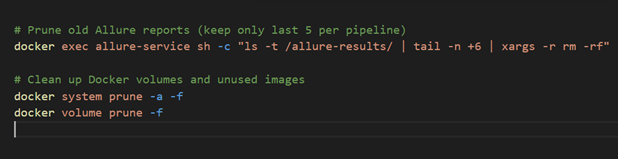
These commands:
- docker system prune -a -f: Removes all unused images, containers, networks, and build cache (force delete without prompts)
- docker volume prune -f: Removes all unused Docker volumes (including orphaned Allure data)
Outcome: Artifact sprawl stopped; VM usage stabilized at sustainable levels
Key Results (Based on Our Data)
| Metric | Before Optimization | After Optimization | Reduction (%) |
| Avg. Video Size | 9 MB | 2.7 MB | 70% |
| Screenshot Size (avg) | 850 KB | 420 KB | 51% |
| Allure Reports Retained | Unlimited | 5 days | Controlled |
Trade-Off: What’s Compromised, What’s Not
- Video quality: Slight reduction in sharpness (640×480, CRF 25), but sufficient for UI bug diagnosis and step review.
- Long-term evidence: Only last 5 days of reports/video; archive critical builds off-VM if needed.
- Processing time: Compression step adds 2-3 min to pipeline—acceptable for most pipelines but worth monitoring.
What remains strong: Debugging value is preserved for failed runs—with all evidence attached. Routine test artifacts for passed runs no longer clog the VM.
Further Enhancements
- Custom Archive Storage: Move older artifacts to cloud object storage at low cost (Azure Blob/S3)
- Smart Retention: Use tags or labels for tests in the builds for specified project which requires longer retention (e.g., releases, regression campaigns)
- Dashboard Integration: Summarize pipeline/storage health with a Grafana or Pulse dashboard
What Are the Key Implementation Steps?
1. Audit Your Artifact Storage: Use disk commands and build logs to baseline current usage.
2. Tune Playwright Config: Start with failed-only videos/screenshots and lower resolution. Validate clarity.
3. Integrate FFmpeg Compression: Test CRF 20–28; pick a balance for your needs.
4. Automate Retention & Cleanup: Cron jobs, pipeline scripts, or artifact policies.
5. Monitor & Iterate: Review impact weekly. Adjust policies as your pipeline/test volume grows.
Testrig’s Key Exploration Areas
- Artifact bloat happens fast when scaling automation—configuration defaults are rarely optimal at scale.
- Slight reduction in video quality is a small price for a massive infrastructure savings.
- Automation (cleanup, retention, alerts) is better than manual intervention—removes operational burdens and surprises.
- Every testing team can start with Playwright config tuning before moving to more complex compression or archiving.
End Note:-
Optimizing Playwright test artifact storage delivered measurable infrastructure savings and improved pipeline reliability.
By tuning defaults, compressing intelligently, and automating retention, Testrig’s Azure VM is now lean—and the debugging workflow remains robust.
Teams facing similar storage constraints can start with configuration tweaks. For each optimization, evaluate the trade-off between artifact evidence and infrastructure cost. Efficient reporting enables greater test coverage, better insights, and less time spent firefighting infrastructure.
Optimize Test Pipelines with leading Playwright Test Automation Company— Reduce Storage, Boost CI/CD Reliability, and Gain Smarter Insights. Connect with Testrig Today.